
Are you looking to improve your internet performance, especially for gaming and streaming? Fiber internet was made for this moment. With fast, symmetrical speeds and tons of bandwidth, fiber internet will not only improve your internet connectivity now, but it's also built to grow for generations to come. In this interview with Ziply Fiber Network Operation Engineer Robert Cichy, we break down the benefits of fiber internet and how to get the most out of it for the ultimate gaming and streaming experience.
Thanks for chatting with us, Robert. Let's start with what you recommend as the ultimate setup for gaming. How can gamers and streamers enjoy the fastest speed with the least lag?
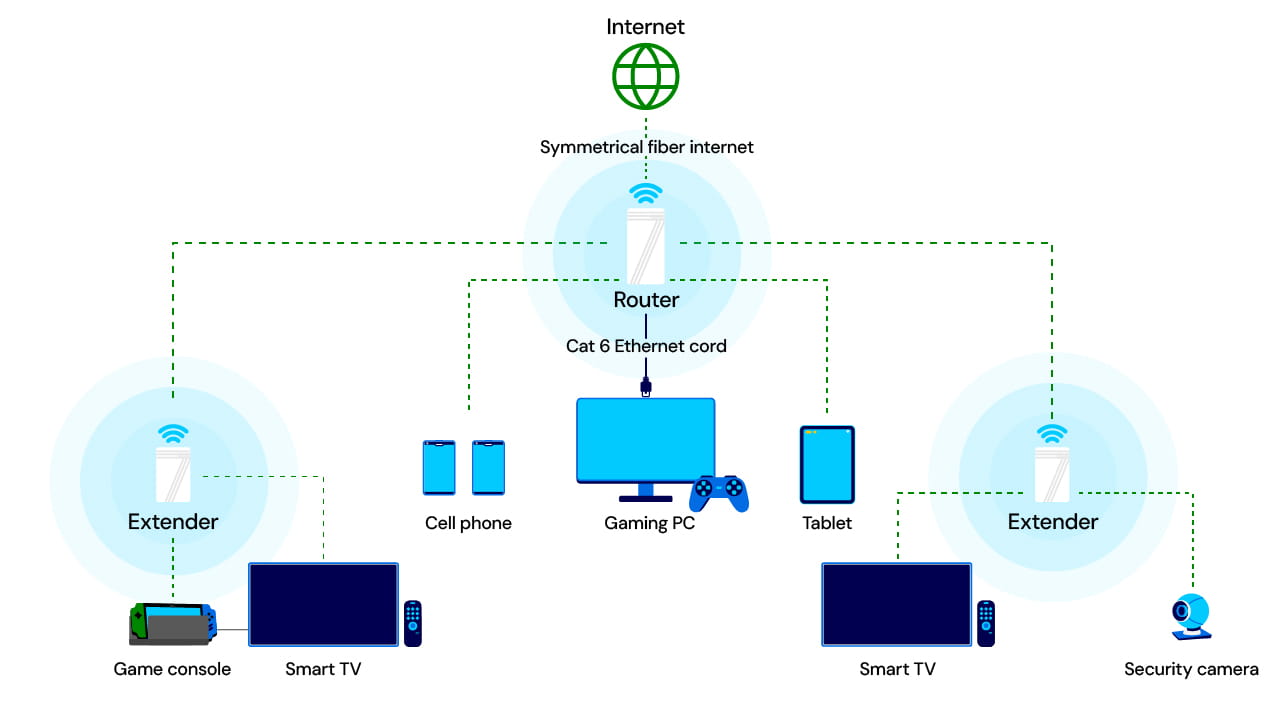
If you want to get the best quality gaming or streaming, with low lag and buffering, I recommend connecting your gaming PC directly to the router using an Ethernet cable. Let your other devices, like your smart TV, phone, laptop or tablet connect to the wireless. Use a wireless extender, and you can even plug in a gaming console to it directly for better performance. Any time you connect a gaming device by wire instead of WiFi, you'll see better speed and stability.
Why is it better to connect the gaming PC directly to the router with an Ethernet line?
A wired connection eliminates issues you can see with WiFi such as interference, distance or signal drops. Keep in mind that wireless connections are always going to be slower than wired connections. In Ziply Fiber lab testing, we saw a 5 Gig plan get 4 Gigs of speed over wireless with WiFi 7, which is really good, but wireless speeds depend on a lot of factors in individual homes. Direct connections are the best for downloads, streaming and competitive gaming because you get the speed right from the source.
To connect the Ethernet line to the router you'll want to use a Cat 6 Ethernet cord. These are inexpensive and easy to find online or at a hardware store.
You mentioned symmetrical speeds. Can you explain what that is and why it matters?
Symmetrical speeds mean that upload and download speeds are the same. Cable companies usually give you much higher download speeds than upload, because the technology was made more for one-way transmission. Now with the new online era we're in, we need to send more data back out to the internet. Livestreaming a game on YouTube or sharing my screen in a videocall, for example, requires sending data out. When speeds are the same, you'll see fewer buffering wheels and less lag, which is crucial for gaming and watching movies and shows. It's also pivotal for videoconferencing—you'll see less glitch and your image won't freeze as much.
Is a wired connection the preferred option for streaming?
Absolutely. You can stream over WiFi, but if packets drop or interference occurs, your stream can still lag or freeze. You might not notice that when watching a movie because video buffers ahead, but when streaming live, you feel every hiccup immediately.
That said, our plans at Ziply Fiber are optimized for all our modern online needs, even over WiFi. Our routers are made for our speeds and service. So, while yes, you may still encounter some glitches when gaming or streaming over WiFi, you'll have a better overall experience than cable or DSL, or even satellite, because their speeds are much slower and asymmetrical.
What makes Ziply Fiber's WiFi 7 router special?
Think of WiFi like a highway. The 2.4 GHz band has only three lanes, channels 1, 6 and 11, so it gets crowded easily. The 5 GHz and 6 GHz bands add more lanes, which helps, but they can still fill up in apartment complexes or dense neighborhoods. The more devices and networks around you, the higher the chance of slowdowns.
With WiFi 7, speed is the first big difference. It also gives you access to that new, less crowded 6 GHz spectrum. I helped someone who had a lot of interference using the 5 GHz WiFi band. Once we switched him to 6 GHz, all his WiFi issues disappeared. WiFi 7 also has the benefit of being able to bounce among all three available frequency bands, so if one is running into interference, your connection can seamlessly connect to a less crowded one. This is called Multi-Link Operation, or MLO.
Finally, the app that comes with the router lets you see every connected device, its signal strength, speed and which band it is using. You can even run speed tests right from the app. It puts a lot of control into your hands to maximize your internet experience.
What is the role of WiFi extenders in a home setup?
Extenders help cover dead zones in larger homes. Picture a four-bedroom house. If the router is on one end, you would place extenders toward the middle and far side. Our extenders are called mesh extenders, because they extend the wireless signal across a space in a crisscross fashion.
If you do need an extender with WiFi 7, you'll experience faster speeds because the 6 GHz band provides a stronger backhaul connection to the router.
That's pretty cool. Back to gaming and streaming, what is the minimum internet speed you recommend for a serious gamer or streamer?
For serious gaming or content creation, 1 Gbps (also known as our popular Fiber Gig plan) or higher is best, especially if multiple people share the connection. Families with two parents and a few kids, or housemates in college, would benefit from a 1 Gig connection or higher. At Ziply Fiber, we offer 2 and 5 Gig, even 10 and 50 Gig. Most average internet users will be happy with 1 Gig.
Other than symmetrical speeds, why is fiber internet generally a better experience than cable?
With fiber, the connection runs directly to your home. With cable, the connection is shared with your neighborhood. You get more consistent speeds with this "dedicated" connection, and you won't experience slowdowns when a lot of people are online at the same time. At Ziply Fiber, we never need to throttle or implement data caps—which means slowing down the internet for individuals or a group of homes because the ISP is running out of bandwidth—because we have a ton of headroom for extra internet traffic. And last but not least, the technology is built for the future. Cable is sort of retrofitted for the internet, but it was made for television. Fiber internet is made for the internet, and it's so robust that it will serve many generations into the future and be able to grow along with our increasing internet needs. For gaming, streaming and remote work, it is the most reliable option available.